
Only if they took a copy while they still had access. Once the project is closed to them, the records stay in the head contractor's account. SIINC backs up the Procore projects your account is a member of, subject to your permissions, so the copy is already in your storage when access ends.
Have the project evidence ready when a construction claim or dispute arrives.
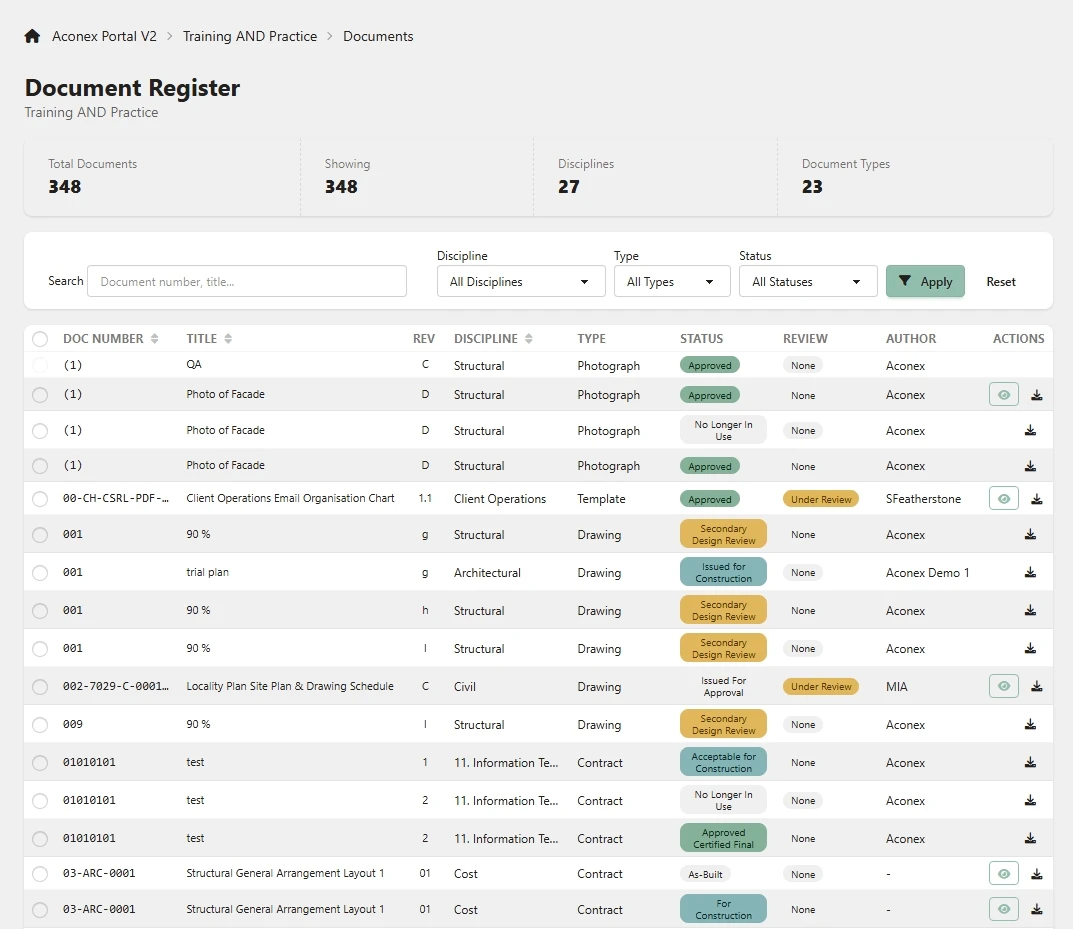
Variations, extensions of time (EOTs) and defect claims are argued from contemporaneous records such as daily logs, RFIs, correspondence and change orders. Those records often sit in another company's platform, and your access ends at closeout. SIINC backs up Procore, Autodesk Forma and BIM 360, and Oracle Aconex projects into storage you own.
- Platforms
- Procore, Autodesk, Aconex
- Who owns it
- Risk, legal and insurance, Commercial and project managers
- Backups stored in
- Amazon S3 or Azure Blob Storage, in your account
- Last reviewed
- 28 Oct 2026
Last reviewed
What goes wrong with the evidence for variations, EOTs and claims?
- The final account, an adjudication or a defect claim often arrives after your access to the head contractor's or owner's platform has ended. Oracle closes an Aconex project in not less than 30 days, and every organisation then loses access unless a subscription or archive covers it.
- The records that prove your variation sit in someone else's account. In Autodesk Forma and BIM 360, only the hub's account administrators can archive or deactivate a project, and project members lose access the moment they do.
- A claim turns on what was current on the day. Which drawing revision was issued, which RFI response came first and when a notice was received decide the outcome, and a folder of final PDFs does not show any of that.
- A closeout export captures one moment. A Procore Project Archive holds what existed when it was built, so records deleted or overwritten earlier in the job are not in it, and its download link lasts 30 days.
- Defect claims arrive years later. Limitation periods for building claims run long after the project closes, and they vary by jurisdiction, contract and type of claim.
- Rebuilding a timeline from personal inboxes and old exports is slow and leaves gaps, and the site team has usually moved to other jobs.
Which project records decide a variation, EOT or defect claim?
Usually the contemporaneous records that show what was instructed, when, by whom and what it cost.
The table maps common claims to the records that usually decide them, and where those records sit in Procore, Autodesk Forma and BIM 360, and Aconex. Keep the revision history and attachments with each record, not just the latest version.
| Claim | Records that usually decide it | Where they sit on the platforms |
|---|---|---|
| Variation | The instruction, the RFI or site query behind it, the drawing revision it changed, and the priced and approved change | Procore RFIs, change orders, drawings and correspondence. Autodesk Forma and BIM 360 RFIs, issues and files with versions. Aconex mail, documents and workflows. |
| Extension of time | Daily logs or site diaries, the programme at each update, delay notices, weather records and meeting minutes | Procore daily logs, schedule, meetings and correspondence. Autodesk Forma and BIM 360 issues, photos and files. Aconex mail and tasks. |
| Payment claim or final account | Progress claims, payment schedules, invoices, approved variations and the contract sum | Procore budget, contracts, change orders, invoices and payments. Aconex mail and documents. |
| Defect claim | Drawings and specifications with every revision, submittals, inspection and test records, certificates and as-builts | Procore drawings, specifications, submittals, inspections and punch list. Autodesk Forma and BIM 360 files and models, submittals, reviews and transmittals. Aconex documents and supplier documents. |
How do you keep your side of the record on another company's project?
Take your own copy while you still have access, and keep taking it through the job. Once the head contractor or owner closes, archives or deactivates the project, your access and your options end with it.
Each route has a catch. A Procore Project Archive needs Read Only permission on every tool you include and a download within 30 days. A handover set from the head contractor is their selection, in their format. Aconex archive access depends on the owner's subscription with Oracle. A scheduled backup runs without anyone remembering, but you pay for the service and storage, and an admin of the account that owns the project has to approve the connection.
- Start in the first weeks of the job, not at practical completion.
- Include daily logs, RFIs, correspondence and change orders, not only drawings.
- Keep the copy in storage your company controls, with a named owner.
How SIINC keeps claims evidence in your own storage
- Your side of the record, in your bucket
- SIINC backs up the Procore projects your account is a member of, and the Aconex projects your connection can see, including ones another organisation owns, subject to your permissions. What it captured stays in your Amazon S3 or Azure Blob storage after your access ends.
- Field, commercial and correspondence records
- Procore daily logs, observations, inspections, RFIs, correspondence, change orders, invoices and payments are selectable components. Aconex mail is backed up with its related items, so a thread reads in context. For Autodesk Forma and BIM 360, SIINC captures files with every version, plus issues, RFIs, submittals, transmittals and reviews.
- Deleted and overwritten records kept
- Sync runs keep deletions for the term of your plan, and file versions are captured, so a record removed or overwritten in the platform before the claim is still in your copy.
- The RFI behind the variation, found in minutes
- Search the Procore Workbench by project, component and record, open the RFI with its official response, versions and attachments, and download it with the change order. The Aconex Portal gives eight module views with record details and bulk ZIP download.
- When each record was captured
- Execution history records every run with its scope, size, warnings and errors, so you can show when the project was backed up. A checksum is recorded for every file and the run history is tamper-evident. An exportable client audit log of every user and admin action, kept for 12 months, shows what was backed up and who accessed it.
Sources
Construction claims and disputes records questions
Construction claims and disputes records questions
Not from Aconex, unless an archive covers the project. Oracle closes a project in not less than 30 days, and an offline Aconex Project Archive holds your sent, received and draft mail. Without an archive, mail has to be exported one item at a time before the project closes.
Often for years, long after the project closes. Limitation periods for defect claims vary by jurisdiction, contract and type of claim, and some run from when a defect is found rather than from completion. Our records-retention guide covers which records matter and what to ask your lawyer. This is general information, not legal advice.
It can be, if it was built at the right time and someone saved it. It holds what existed when it was created, mostly as PDFs, and the download lasts 30 days. Records deleted or changed earlier in the job are not in it.
Yes. In SIINC every module is a checkbox, so you can back up daily logs, RFIs, correspondence, change orders and invoices and leave out heavy data such as photos or models.
Platforms and roles for claims and disputes
- PlatformProcoreKeep every Procore project after closeout, in storage your company owns.
- PlatformAutodesk Forma and BIM 360Autodesk Forma and BIM 360 backup, outside Autodesk, in storage your company owns.
- PlatformOracle AconexKeep Oracle Aconex mail and documents after the project closes, in storage you own.
- RoleRisk, legal and insuranceEvidence of what was captured, and when, for as long as liability runs.
- RoleCommercial and project managersThe records behind variations, EOTs and the final account.
- RoleGeneral contractorsEvery live and closed project, backed up to the company's own cloud.
Start a trial workspace or book a demo and we will run the first backup with you.